How to Apply for Mutation Online (Free Latest Method 2026)
Applying for land mutation online is now quicker, simpler, and far more accessible through the Banglarbhumi portal. What once required multiple visits to government offices, long queues, and manual paperwork can now be completed from the comfort of your home. Whether you’ve recently purchased a property, inherited land, or received ownership through a gift deed, the online system allows you to update official land records efficiently without unnecessary delays.
This digital approach not only saves time but also brings greater transparency to the entire process. From submitting your application to tracking its progress, everything is streamlined within a single platform. In this guide, you’ll learn the complete step-by-step method to apply for mutation, how to check your application status using different search options, the common reasons why applications may get delayed, and practical tips to ensure your mutation request is approved smoothly without complications.
What is Property Mutation?
Property mutation is the official process of updating ownership details in government land records after a property is transferred. While legal documents such as sale deeds, gift deeds, or inheritance papers establish ownership rights, mutation ensures that the new owner’s name is recorded in government records, making it legally valid for administrative and taxation purposes.
In simple terms, mutation acts as a bridge between ownership on paper and recognition in official records. Without completing this step, the government may still consider the previous owner responsible for property-related matters.
Failing to update mutation records can lead to several complications, including:
- Incorrect Property Tax Billing – Taxes may still be issued in the previous owner’s name
- Problems in Selling or Transferring Property – Future transactions can be delayed or legally challenged
- Difficulties in Loan Approval – Banks often require updated mutation records as proof of ownership
Completing property mutation on time ensures smooth ownership recognition, accurate tax records, and hassle-free future transactions.
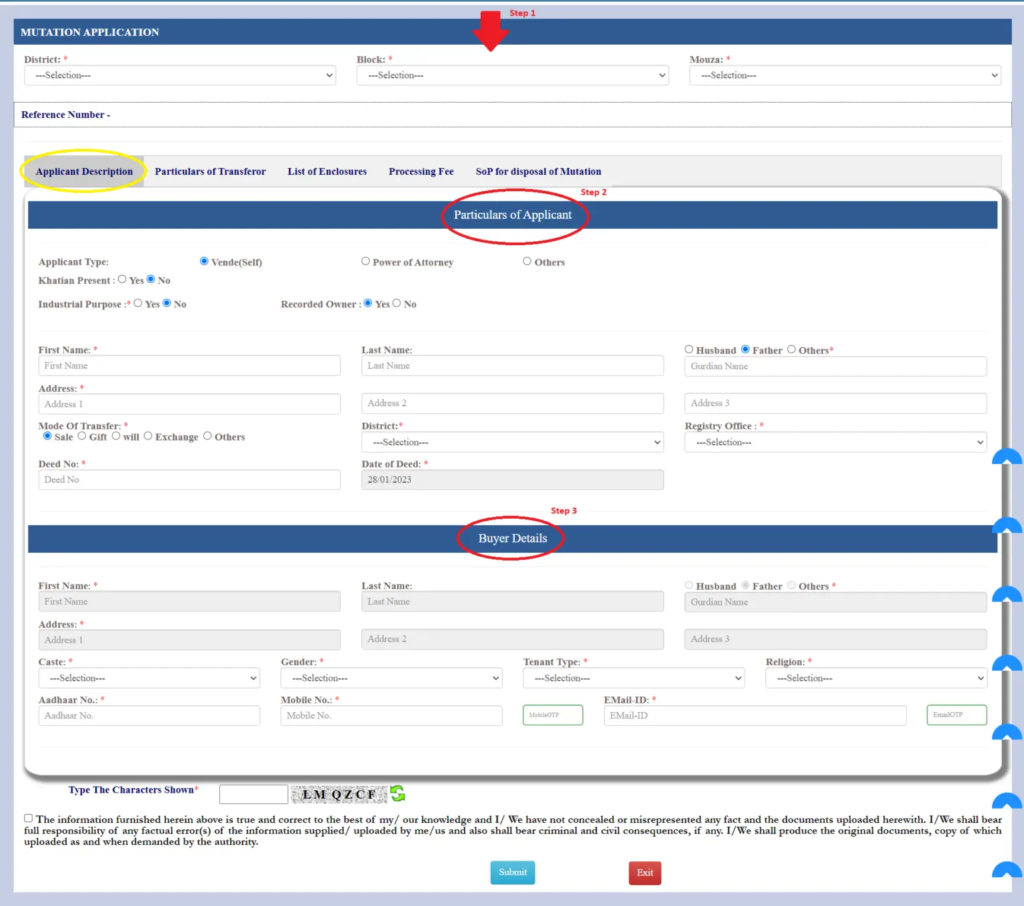
Steps to Apply for Mutation Online (Detailed Guide)
Applying for land mutation through the Banglarbhumi portal is a structured process designed to be simple, transparent, and user-friendly. Below is a detailed explanation of each step to help you complete your application without errors or delays.
How to Track Mutation Status Online
Tracking your mutation status through the Banglarbhumi portal is a straightforward process designed to help landowners stay updated without visiting any government office. Once your mutation application is submitted, you can monitor its progress at any time using the online tracking system.
Log in to the Banglarbhumi Portal
Start by opening the official Banglarbhumi website in your browser and logging into your registered account. If you are a new user, complete the registration first using your mobile number, email ID, and personal details. Make sure your login credentials are correct before proceeding to avoid access issues.
Go to Citizen Services Section
After successfully logging in, navigate to the Citizen Services menu available on the dashboard. This section contains all land-related services provided by the government portal. Carefully locate and open the “Online Service Status” option to continue the tracking process.
Select Mutation Status Option
From the available service list, click on “Mutation Status” to open the tracking interface. This option allows you to check real-time updates of your land mutation application. Ensure you select the correct service type to avoid loading incorrect records.
Enter Required Application Details
You will now need to enter key details such as your plot number, khatian number, or application reference ID. Select your District, Block, and Mouza carefully from the dropdown options. Accurate data entry is important because incorrect details may show no results or wrong records.
Complete Captcha and Submit Request
Before viewing results, complete the captcha verification to confirm your request. This step ensures secure access and prevents automated system misuse. After verification, click on the Submit button to fetch your mutation status details instantly.
View Your Mutation Status Result
Once submitted, the system will display your mutation application status on the screen. You can view important details including case number, application date, buyer information, execution date, and current status. This helps you track whether your mutation is pending, under review, or approved.
Ways to Check Mutation Status
You can search using multiple methods depending on the details you have available. The Banglarbhumi portal provides flexible options so users can easily track their mutation application without any difficulty.
Plot Wise / Khatian Wise Search
One of the most common methods to check mutation status is using Plot Wise or Khatian Wise search. In this method, you need to enter your plot number or khatian number along with basic land details such as district, block, and mouza. This option is useful when you have complete land record information and want direct results linked to your property.
Case Number & Date Search
If you have already applied for mutation, you can track your application using the case number and its associated date. This method is highly accurate because every mutation application is assigned a unique case ID. Simply enter the case number and submission date to view the latest processing status of your request.
Deed Number & Year Search
Another useful option is searching through your deed number and the year of registration. This method is especially helpful when you are tracking mutation linked to a property sale or transfer document. By entering deed details correctly, you can quickly retrieve mutation records associated with that transaction.
Location Based Search (District, Block, Mouza)
If you do not have document-specific details, you can still search mutation status using location-based filters. Simply select your district, block, and mouza from the dropdown list provided on the portal. This method helps narrow down records based on geographical land classification within government databases.
Seller or Buyer Name Search
Mutation status can also be checked using the name of the seller or buyer involved in the property transaction. This method is useful when you only remember party details but not technical land identifiers. Entering correct names helps the system locate matching mutation applications quickly and efficiently.
Flexible Search System Advantage
The Banglarbhumi portal offers multiple search options to make the mutation tracking process easy for all users. Even if you do not have complete property information, you can still find your application using alternative methods. This flexible system ensures transparency and accessibility for all landowners.
Key Benefits of Online Property Mutation
Time Saving and Faster Processing
Online mutation significantly reduces the time required for property ownership updates. Users no longer need to visit government offices or wait in long queues. The digital system speeds up verification and processing, making the entire workflow much faster compared to traditional offline methods.
Convenience and Anytime Access
One of the biggest advantages of online mutation is convenience. Users can apply, upload documents, and track status anytime from anywhere using a mobile or computer. This removes the need for physical visits and makes the process accessible 24/7.
Unique Reference ID Tracking
Every mutation application receives a unique reference ID after submission. This ID allows users to track their application status in real time. It also helps in future communication with authorities and ensures transparency in the process.
Transparency in the System
The online mutation system ensures complete transparency at every stage. Users can clearly see application progress, verification updates, and approval status. This reduces confusion and builds trust in the land record management system.
Reduced Paperwork and Manual Work
Online mutation eliminates unnecessary paperwork and manual documentation. All required documents are uploaded digitally, reducing physical file handling. This also helps in maintaining better record organization and storage efficiency.
Fewer Errors and Faster Approval
The digital system reduces human errors caused by manual data entry. Automated verification checks improve accuracy and minimize mistakes. As a result, mutation applications are processed and approved faster than traditional offline systems.
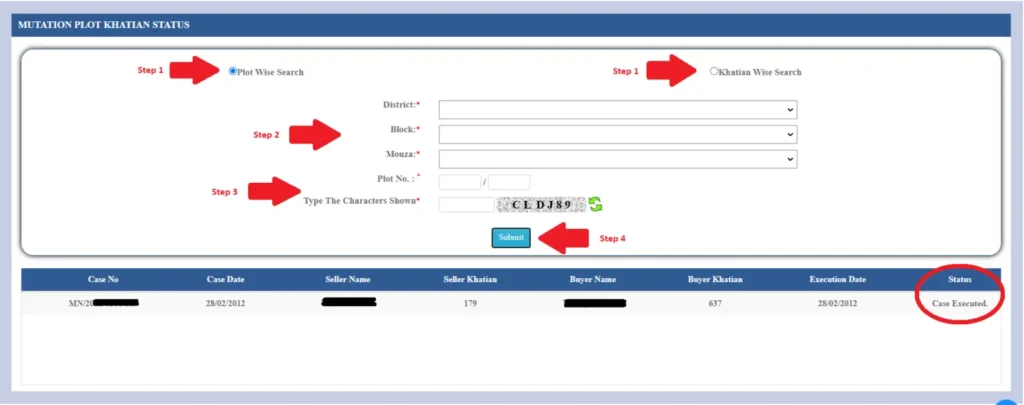
How to Check Mutation Plot Khatian Status
Login to Banglarbhumi Portal
To begin checking your mutation plot or khatian status, first log in to the official Banglarbhumi portal. Use your registered credentials and navigate to the Citizen Services section where all land-related services are available.
Go to Online Service Status
After logging in, open the Citizen Services menu and select the Online Service Status option. This section allows users to track different types of land record applications including mutation status updates.
Select Mutation Plot Khatian Status
Click on the Mutation Plot Khatian Status option to proceed. This feature is specifically designed to track mutation applications linked with plot or khatian numbers.
Enter Plot or Khatian Details
Now enter your plot number or khatian number along with location details such as district, block, and mouza. Make sure all information matches your official land records to avoid errors or incorrect results.
Complete Captcha Verification
Before submitting, complete the captcha verification to confirm you are a real user. This step helps secure the system and prevents automated or fake submissions.
View Mutation Status Result
After submission, the system will display your mutation status. You will see important details such as case number, buyer information, execution date, and current application status.
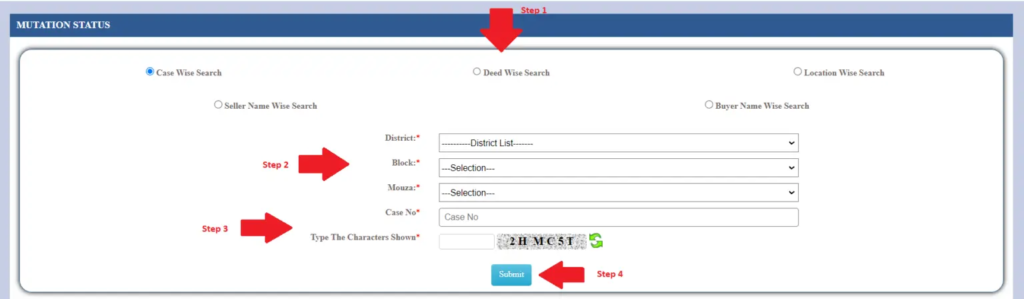
Different Ways to Track Mutation Application Status Online – Search by Case, Deed, Location, and Seller/Buyer Name Wise
The Banglarbhumi online system allows landowners to easily monitor their mutation application progress through several alternative search options. These methods are designed to ensure that users can retrieve their records even if they only remember partial details of their property or application.
Application Reference Number Tracking
If you have already submitted your mutation application, you can easily track its progress using the application reference number issued at the time of submission. This method is the most direct and reliable because it connects you instantly to your specific application file and displays the latest processing stage without needing any additional details.
Registration Document (Deed) Lookup
Users who have completed a property transaction can also check mutation status using their registered deed information. By entering the deed number along with the year of registration, the system can retrieve all mutation records linked to that legal property transfer and show the current update status.
Land Location Search Method
When document details are not available, the location-based search method becomes useful. By selecting the district, administrative block, and mouza from the available options, users can narrow down the records and locate their mutation application based on the exact geographical land classification.
Party Name-Based Search
Another convenient option is searching through the names of the parties involved in the transaction, such as the seller or buyer. This method is especially helpful when users remember personal details but do not have access to technical identifiers like plot number or case ID.
Combined Search Flexibility System
The Banglarbhumi portal is designed to support multiple search inputs, ensuring users are never restricted to a single method. Whether you have a case ID, deed details, location data, or party names, the system provides alternative ways to locate and track your mutation application easily.
What You Will See After Searching
Once the correct details are submitted, the system displays complete application information such as:
- Current stage of mutation processing
- Identification of the involved buyer or applicant
- Official registration or case reference details
- Date-related records of processing activity
- Overall status update of the mutation file
What is Property Mutation?
Property mutation refers to the official government process of updating land or property ownership records after a transfer takes place. This transfer may occur through a sale, inheritance, gift, or any legal agreement that changes the ownership of the property. Once the transaction is completed, it becomes necessary to reflect the new owner’s name in government land records.
Although legal documents such as sale deeds, gift deeds, or inheritance certificates establish who owns the property, mutation serves a different purpose. It ensures that the government revenue and land records departments officially recognize the current owner for taxation and administrative purposes. In simple terms, it is the step that links legal ownership with official government records.
If mutation is not completed, the government records will still show the previous owner’s name. This can lead to several complications, including problems in paying property taxes, difficulties during resale or transfer of the property, and delays in loan approvals from financial institutions. Therefore, completing mutation is an important step to keep property records accurate, updated, and legally valid in the eyes of government authorities.
Why is Mutation Helpful?
Legal Ownership Recognition
Mutation ensures that the new owner is officially recorded in government land records after a property transfer. This step is essential because it links legal documents with official government databases, making ownership recognition valid for administrative and legal purposes.
Correct Assignment of Tax Liability
One of the key benefits of mutation is that it updates property tax responsibility to the actual owner. Once the records are updated, the government ensures that tax notices and payments are directed to the correct person, avoiding confusion or financial errors.
Prevention of Property Disputes
Mutation helps reduce the chances of legal conflicts by keeping ownership records accurate and up to date. Clear and updated land records make it easier to establish rightful ownership and avoid disputes between parties in future transactions.
Required for Utility Connections
Updated mutation records are often required when applying for essential utility services such as electricity, water, and gas. Service providers use these records to verify ownership before approving new connections or transferring existing ones.
Important After Property Transfer
Mutation becomes necessary whenever property ownership changes due to sale, inheritance, gift, or agreement. It ensures that the new owner’s details are properly recorded in government systems without any inconsistencies.
Ensures Smooth Legal and Financial Process
Keeping mutation updated helps avoid problems during property resale, loan approval, or legal verification. Without updated records, owners may face delays or complications in financial and administrative processes.
Why Should You Appeal for Mutation?
When Ownership Changes Occur
You should apply for mutation whenever there is a change in property ownership. This typically happens after a purchase, inheritance, gift transfer, or a formal sale agreement. Updating mutation ensures that the new ownership is properly recorded in official government land records.
Official Government Record Update
Mutation makes sure that the new owner’s name is entered into government land and revenue systems. This step connects legal ownership documents with official records, ensuring that the property is recognized correctly in administrative databases.
Avoids Legal and Financial Issues
Keeping mutation updated helps prevent future legal or financial complications. Without proper mutation, ownership records may remain outdated, which can create problems during property transactions, tax payments, or ownership verification processes.
What Happens After You Submit the Request?
Initial Verification by Authorities
After you submit the mutation request, the application first goes through an official verification process. Government authorities carefully review all submitted details to ensure the information is complete, accurate, and matches existing land records.
Document Checking Process
All uploaded documents such as sale deeds, identity proofs, and land records are thoroughly checked. This step ensures that there are no discrepancies or mismatches in ownership details before the application can proceed to the next stage of approval.
Field Inspection (If Required)
In some cases, officials may conduct a physical field inspection of the property. This is done to verify land details on-site and confirm that the application data is correct and consistent with the actual property situation.
Final Approval and Record Update
Once verification is successfully completed, the mutation request is approved. The ownership details are then officially updated in government land and revenue records, ensuring legal recognition of the new owner.
Issuance of Mutation Certificate
After approval, a mutation certificate is generated and issued to the applicant. It can either be downloaded from the official portal or collected from the concerned office, serving as proof of updated ownership records.
Key Points for a Smooth Online Mutation Process
Ensure Accurate Document Submission
Applicants must carefully verify that all submitted documents are correct, complete, and properly scanned. Clear and readable files help avoid rejection and ensure smooth processing of the mutation application without unnecessary delays.
Match Details with Official Records
All information such as applicant name, plot number, khatian details, and land records must exactly match official government documents. Even minor mismatches can lead to verification issues or application rejection.
Save Application Reference Number
After submitting the mutation request, users should safely store the application or reference number. This number is essential for tracking the application status, making payments, and accessing future updates.
Respond Quickly to Verification Requests
If authorities request additional documents or clarification, users should respond promptly. Quick responses help prevent delays in the verification process and ensure faster approval of the mutation request.
How to Check Mutation Status Using Mobile Number or Email Instead of Plot/Khatian?
In most land record systems, searching mutation status directly with a mobile number or email is not fully supported. These details are mainly used for login or verification purposes rather than record retrieval. However, some portals may send OTPs to registered mobile numbers or email IDs to help users access their accounts securely.
For accurate tracking, users are usually required to provide details such as plot number, khatian number, or application reference ID. These identifiers are directly linked to the land database, making the search more reliable and precise.
Why Are Mutation Applications Delayed Even After Submitting All Documents?
Delays in mutation processing are quite common and can happen for several reasons. One major cause is mismatch or inconsistency in submitted documents. Even minor spelling errors or incorrect details can slow down verification.
In other cases, the application may require field inspection by revenue officials. Legal objections from third parties or ongoing disputes over the property can also pause the process. Additionally, high workload in government offices may further extend processing time.
Can a Mutation Be Cancelled or Reversed After Approval?
Yes, mutation can be changed or reversed, but only under specific conditions. If any error, fraud, or incorrect entry is discovered after approval, authorities can initiate a correction process.
However, this is not automatic. It requires proper investigation, supporting evidence, and legal approval from the concerned land revenue department.
What to Do If a Mutation Is Done but Not Updated in Municipal Tax Records?
Sometimes mutation is approved in land records but not reflected in municipal tax systems. In such cases, the property owner should contact the local municipal office.
They need to submit a copy of the mutation certificate along with ownership documents. The municipal authority then verifies the details and updates the tax records accordingly.
Is Mutation Mandatory for Flats in Housing Societies with Their Own Records?
Yes, mutation is still necessary even if a housing society maintains internal ownership records. Government land and revenue systems must reflect the legal owner for taxation and official recognition.
Without mutation, property ownership may not be fully valid in government databases, which can create issues during resale or legal verification.
How Does Automatic Mutation Work After the Notice Period Expires Without Objections?
In some regions, mutation can be processed automatically if no objections are raised during the public notice period. Once the waiting period ends and verification is complete, the system may update ownership records without manual approval.
This automated process helps speed up cases where there are no disputes or legal complications.
Can Mutation Be Automatically Done After Property Conversion Orders in Jaipur?
In certain administrative systems, land conversion and mutation are linked processes. When land use is officially changed, the ownership record may also be updated automatically.
However, this depends on local rules and digital integration between land revenue and municipal departments.
How to Resolve Disputes Over Boundary or Measurement Differences in Mutation?
Boundary or measurement disputes are resolved through official land surveys conducted by revenue authorities. Survey teams verify physical boundaries and compare them with existing land records.
If required, updated maps or legal documents are issued. In complex cases, disputes may be settled through legal proceedings.
Is There a Time Limit to Complete Property Mutation After Transfer?
There is no strict nationwide deadline for mutation, but it is strongly recommended to complete the process within 30 to 60 days after property transfer.
Delaying mutation can create problems in tax assessment, legal ownership verification, and future property transactions.
How Does Mutation Affect Loan Approvals or Property Financing?
Banks and financial institutions often require updated mutation records before approving property loans. It serves as proof that the applicant is the legal and recognized owner.
If mutation is missing or outdated, loan processing may be delayed or even rejected.
Does Mutation Automatically Update Utility Bills (Electricity, Water, Gas)?
No, mutation does not automatically update utility connections. Separate applications must be submitted to electricity, water, and gas departments.
These departments update ownership records independently after verification of documents.
What Happens if Third Parties File Objections During the Mutation Notice Period?
If someone raises an objection during the notice period, the mutation process is temporarily paused. Authorities then review the complaint and verify both sides.
The application is only approved after the dispute is resolved.
Mutation Correction vs. Revision: What’s the Legal Difference?
Mutation correction refers to fixing small mistakes such as spelling errors or minor data issues. Revision, on the other hand, involves major changes due to legal orders, ownership disputes, or new evidence.
Both processes require official approval, but revision usually involves deeper verification.
Can a Mutation Be Done Without Physical Inspection if No Change of Ownership?
Yes, in certain cases mutation can be processed without physical inspection, especially when only corrections are required and documents are clear.
However, authorities still reserve the right to conduct inspection if any doubt arises.
How Mutation Procedures Differ Across States: West Bengal, Uttar Pradesh, and Odisha
Mutation procedures vary depending on the state’s land record system. For example, West Bengal uses the Banglarbhumi portal, Uttar Pradesh operates through Bhulekh, and Odisha also has its own digital land record system.
While the platforms differ, the core purpose remains the same: updating official ownership records after property transfer.
Mutation in Rural Areas: Bhulekh or Land Records Portals
In rural regions, mutation is usually managed through state-level Bhulekh or land record portals. These online systems allow users to apply, track, and verify mutation status without visiting government offices.
This digital approach has made land record management more accessible and transparent for rural property owners.
Video Guide
FAQs
This FAQ section provides clear and simple answers to the most commonly asked questions about property mutation.
What is property mutation in land records?
Property mutation is the official process of updating ownership details in government land records after a sale, inheritance, or transfer. It ensures the new owner is legally recognized for tax and administrative purposes.
Is mutation mandatory after buying property?
Yes, mutation is strongly recommended after any property transfer. Without it, government records will not reflect the new owner, which can create issues in taxation, resale, and legal verification.
How long does mutation approval take?
The approval time varies depending on verification workload and document accuracy. In general, it may take a few weeks to a couple of months depending on case complexity and local authority processing speed.
What documents are required for mutation application?
Common documents include sale deed, gift deed or inheritance proof, identity proof, property tax receipts, and supporting land records such as plot or khatian details.
Can mutation be done online?
Yes, many states provide online mutation facilities through official land record portals like Banglarbhumi. Users can apply, upload documents, and track status without visiting government offices.
Why is my mutation application delayed?
Delays can occur due to document mismatch, verification requirements, field inspection, legal disputes, or high administrative workload in the land records department.
Can mutation be corrected after approval?
Yes, corrections are possible if errors or incorrect details are found. However, this requires official approval from the concerned authority and proper supporting documentation.
Does mutation change property ownership legally?
Mutation does not replace the sale deed but ensures government records are updated for taxation and administrative recognition of the new owner.
What happens if mutation is not done?
If mutation is not completed, the previous owner may still be listed in government records, which can cause issues in tax payment, resale, and utility service transfers.
How can I track my mutation status online?
You can track mutation status using application reference number, deed details, or location-based search through official land record portals under the citizen services section.
Final Thought
Property mutation is an essential step to ensure that ownership details are properly updated in government land records after any transfer. It helps maintain legal clarity, accurate tax records, and smooth future transactions. By following the correct process and keeping documents in order, users can avoid unnecessary delays or complications. Online systems have made the process more transparent and convenient than ever before. Staying informed about each step ensures a hassle-free mutation experience.